 |  |
 |  |  |  |  |  |  |
|  | |||||||


| Tutorial Teach,Learn,Share,Discuss and Do everything other than Class Lectures |
| | Thread Tools | Search this Thread | Rate Thread | Display Modes |


|
#3
 25-11-2007, 02:09 PM
| ||||
| ||||
 Rasterizing You can rasterize Smart Objects by right-clicking on the name of the Smart Object layer and choosing Rasterize Layer. This will break the link to the original source file and treat the layer as an ordinary raster layer. Resizing a Document Solution Bring up the Image Size dialog box by selecting Image > Image Size or pressing Ctrl-Alt-I (Command-Option-I on a mac). You can resize the document by altering either the Pixel Dimensions or the Document Size. Use the former when resizing images that will be used on screen (such as images that will be used on a web page), and the latter when resizing images that will be printed. 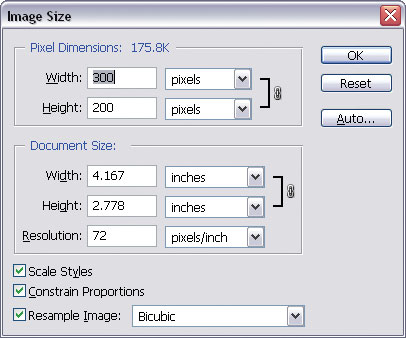 Image Size dialog box You can maintain the original document proportions as you resize the image by checking the Constrain Proportions checkbox. To scale layer styles (drop shadows, strokes, etc.), check the Scale Styles checkbox.
__________________ (¯`v´¯) `*.¸.*` ¸.*´¸.*´¨) ¸.*´¨) (¸.*´ (¸.Bzu Forum   Don't cry because it's over, smile because it happened Don't cry because it's over, smile because it happened   |

 .BZU.
.BZU.





| Tags |
| adobephoto, class, fellows, free, photo shop, shop, tutorial |

« Previous Thread
|
Next Thread »
| Currently Active Users Viewing This Thread: 1 (0 members and 1 guests) | |


 Threaded Mode
| |

 Similar Threads
 | ||||
| Thread | Thread Starter | Forum | Replies | Last Post |
| Proposal of a 3th class boy to 9th class girl. | usman_latif_ch | Funny Cut Piece | 0 | 02-11-2011 07:13 PM |
| New sub-domain, for free web development tutorial added | .BZU. | Suggestion,Feedback and News about site | 0 | 01-07-2010 01:36 PM |
| Dedicated to my lovely friends and class fellows | ghazala | Urdu Poetry | 1 | 18-06-2009 08:54 AM |
| Juniors [ Our New fellows.. | shmsa | Chit Chat | 16 | 05-10-2008 10:22 PM |
Almuslimeen.info | BZU Multan | Dedicated server hosting
Note: All trademarks and copyrights held by respective owners. We will take action against any copyright violation if it is proved to us.
All times are GMT +5. The time now is 04:07 PM.
Powered by vBulletin® Version 3.8.2
Copyright ©2000 - 2026, Jelsoft Enterprises Ltd.
Copyright ©2000 - 2026, Jelsoft Enterprises Ltd.