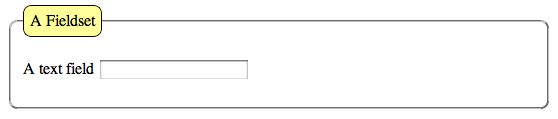
The default display for a fieldset is a square cornered border. In certain browsers (Firefox and Safari and perhaps others) you can use CSS to make rounded corners on the border around the fieldset and around the legend.
Look at this simple form:
HTML Code:
<form id="example" name="example" method="post" action="send.php">
<fieldset>
<legend>A Fieldset</legend>
<label for="ex1">A text field</label>
<input type="text" name="ex1" id="ex1" />
</fieldset>
</form>
Here’s how that looks in Safari, with no CSS styling.

I applied these rules to the fieldset selector in the CSS
HTML Code:
fieldset {
border-radius: 8px;
-webkit-border-radius: 8px;
-moz-border-radius: 8px;
}
Again in Safari, here’s what you see now.

The property used to create rounded corners is the border property. The rule is repeated three times, a redundancy meant to create the effect in as many browsers as possible. The border-radius rule is CSS3, not yet in standard adoption by all browsers. The webkit-border-radius rule is understood by all webkit browsers such as Safari. The moz-border-radius is understood by all mozilla based browsers such as Firefox.
A border can be added to the legend as well. That element can also display the rounded borders. Here’s the CSS.
HTML Code:
legend {
border: solid 1px black;
border-radius: 8px;
-webkit-border-radius: 8px;
-moz-border-radius: 8px;
}
This is how it displays in Safari.

A couple of changes to show how the legend’s appearance might be improved can be made in the CSS.
HTML Code:
legend {
background: #FF9;
border: solid 1px black;
border-radius: 8px;
-webkit-border-radius: 8px;
-moz-border-radius: 8px;
padding: 6px;
}
Now the legend displays like this.