View Single Post
  #2  
Old 24-09-2008, 08:52 PM
.BZU.'s Avatar
.BZU. .BZU. is offline


Join Date: Sep 2007
Location: near Govt College of Science Multan Pakistan
Posts: 9,693
Contact Number: Removed
Program / Discipline: BSIT
Class Roll Number: 07-15
.BZU. has a reputation beyond repute.BZU. has a reputation beyond repute.BZU. has a reputation beyond repute.BZU. has a reputation beyond repute.BZU. has a reputation beyond repute.BZU. has a reputation beyond repute.BZU. has a reputation beyond repute.BZU. has a reputation beyond repute.BZU. has a reputation beyond repute.BZU. has a reputation beyond repute.BZU. has a reputation beyond repute
Thumbs up Re: All Microsoft Word Shortcuts

Quote:
Originally Posted by Waqas Ahmed View Post
In Menu Bar

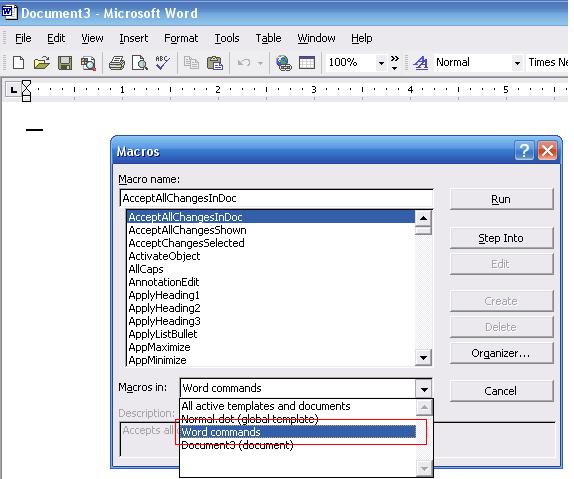
Tools>Macro>Macros

In list open

>Macros in

and select

>Word Commands

select

>List Commands

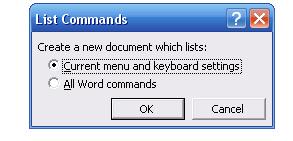
and then Current Menu and Keyboard settings

Press OK.


-----------------------------

What You Think ......??
wow... the great tutorial ...
Thanks for sharing...
Here is the pictorially representation of the tutorial...

Open Macros
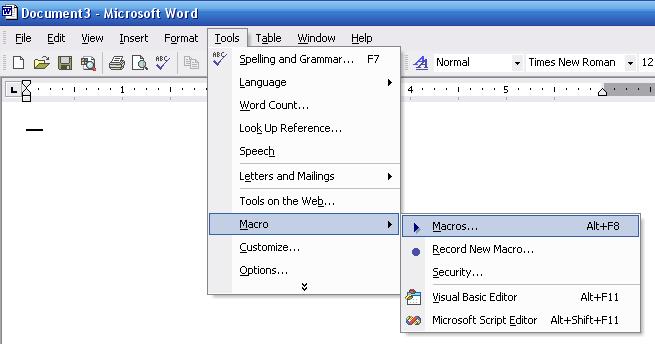
Name:  word.JPG
Views: 411
Size:  34.6 KB
Select the Word Commponets
Name:  word1.JPG
Views: 412
Size:  50.7 KB
After finding the List Command Click on the Run Button
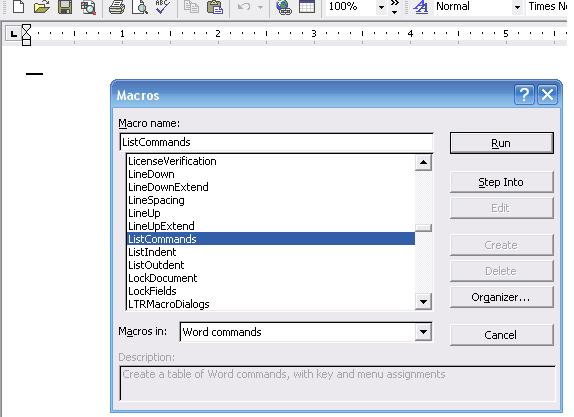
Name:  word2.JPG
Views: 421
Size:  38.3 KB
Clilck on the OK..
Name:  word3.JPG
Views: 379
Size:  10.5 KB
The next page leads to a Doc file that I have attached here in my post...
This file contains all the Command used in Ms Word...


Acha tu http://bzupages.com/f4/short-keys-ha...word-edit-228/ wali keys isi method say nikali gai thein
WWO0OWW

Attached Files
File Type: doc Command Name.doc (365.0 KB, 328 views)
__________________
(¯`v´¯)
`*.¸.*`

¸.*´¸.*´¨) ¸.*´¨)
(¸.*´ (¸.
Bzu Forum

Don't cry because it's over, smile because it happened
Reply With Quote